- Ecommerce
- Shiptheory
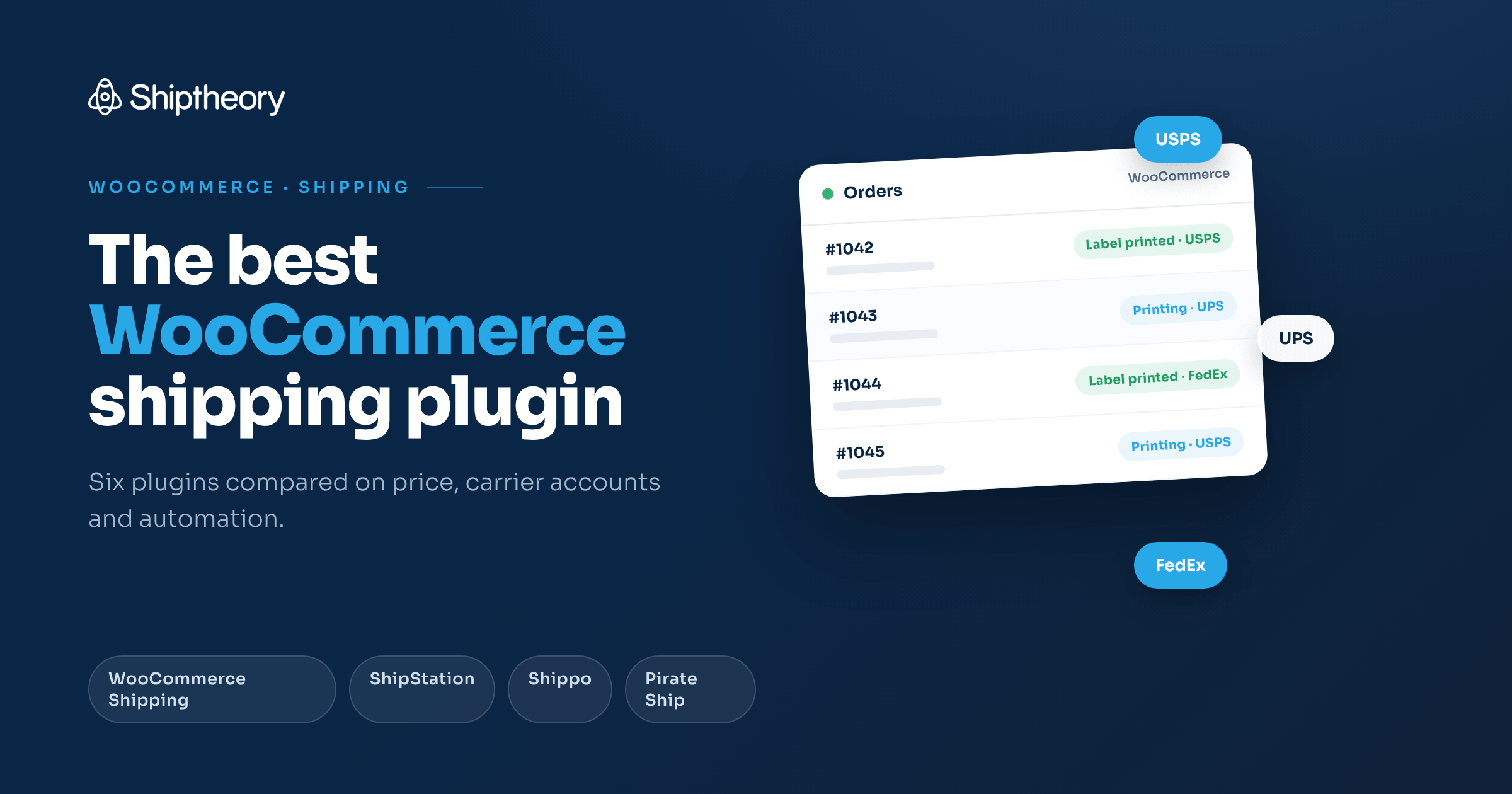
Best WooCommerce Shipping Plugin: 6 Options Compared (2026)

The best WooCommerce shipping plugin: how to choose and set one up
WooCommerce doesn't print shipping labels on its own. To get labels, tracking and carrier rates into your store, you add a plugin or connect a shipping platform, and there are hundreds to choose from.
Here's the short version. If you ship from the US and want free, discounted labels inside WooCommerce, start with the official WooCommerce Shipping plugin or Pirate Ship. If you only ship UPS and want rates and labels inside WordPress, PluginHive's UPS plugin does both. If you want discounted rates with more tools, look at Shippo or ShipStation. If you have your own carrier accounts, sell on more than one channel and want labels to print as soon as an order comes in, Shiptheory is built for that.
We're Shiptheory, so we're not neutral. We've kept this fair: every price comes from each provider's own listing or site, and we say where the free options win.
Three kinds of WooCommerce shipping plugin
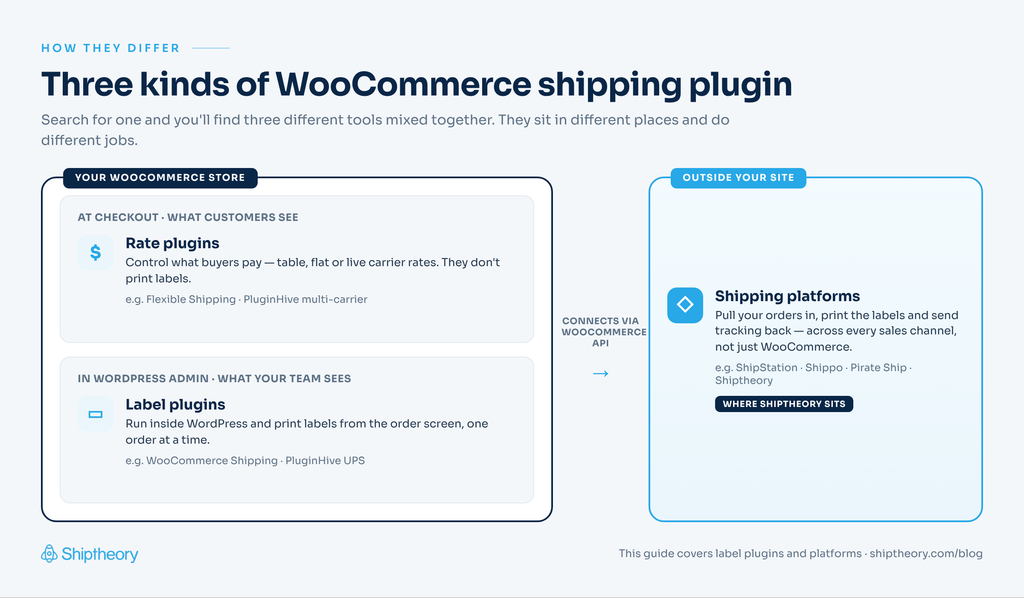
Search for a WooCommerce shipping plugin and you'll find three different kinds of tool mixed together.
- Rate plugins control what customers pay at checkout, with table rates, flat rates or live carrier rates. Flexible Shipping and PluginHive's multi-carrier plugin are examples. PluginHive's multi-carrier plugin shows live UPS, FedEx, DHL Express and USPS rates, but it doesn't print labels.
- Label plugins run inside your WordPress admin and print labels from the order screen. WooCommerce Shipping and PluginHive's UPS plugin work this way.
- Shipping platforms connect to your store from outside. They pull in your orders, print the labels and send tracking back. ShipStation, Shippo, Pirate Ship and Shiptheory work this way, and most handle other sales channels too.
This guide covers the second and third kinds. If you haven't set up your checkout rates yet, start with our WooCommerce shipping guide, which covers zones, methods and shipping classes.
What to look for in a WooCommerce shipping plugin
1. Whose rates you ship on
Some tools sell you discounted postage. Others connect your own carrier accounts, and some charge extra to do it on their free plan. If you have contract rates with UPS or FedEx, check the plan you're looking at uses them.
2. How much it automates
Printing labels from the order screen still means someone opens each order or batch and picks a service. Rules-based automation picks the carrier and service using the destination, weight, value or SKU, and the best tools print the label without anyone pressing a button.
3. The carriers you need
Many WordPress plugins cover one carrier each, so three carriers can mean three plugins and three licences. Platforms connect several carriers in one place.
4. Every channel you sell on
If you also sell on Amazon, eBay, Shopify or TikTok Shop, a platform that pulls every order into one queue saves you running a separate process for each.
5. What happens when WordPress updates
A plugin runs on your site, so it has to keep up with WordPress and WooCommerce updates. PluginHive, for example, says sites that don't renew their licence may fall behind those updates. A platform connects through WooCommerce's API, so there's less on your site to maintain.
6. How the price behaves as you grow
Free tools make their money on postage. Plugins charge a yearly licence per site. Platforms charge a monthly fee, usually capped by labels or shipments. Work out the cost at your busiest month.
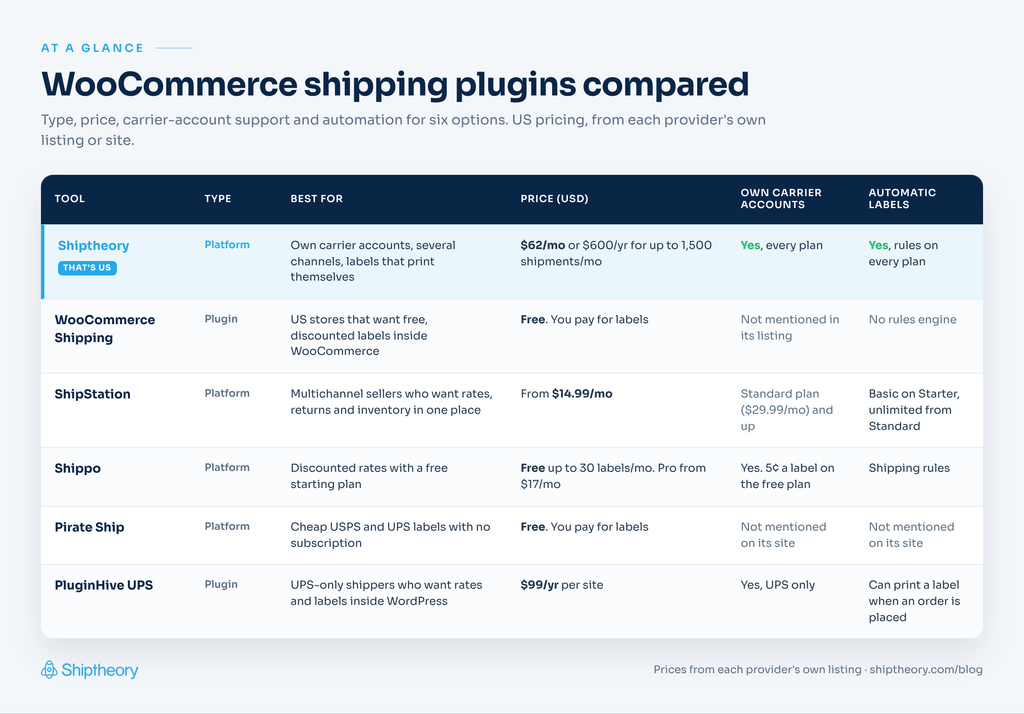
The 6 options in detail
1. Shiptheory: best for automating labels on your own carrier accounts
There's nothing to install. You enter your store's URL in Shiptheory, log in to WooCommerce and approve the connection, and orders start flowing in. Shiptheory's rules pick the carrier and service by destination, weight, value and SKU, and labels print automatically seconds after a sale. The tracking number and link go back to the WooCommerce order.
US sellers connect USPS through a free Stamps.com account, plus UPS, FedEx and DHL, out of more than 70 carriers. Orders from Shopify, eBay, TikTok Shop and other channels land in the same queue. It also syncs inventory, supports barcode scanning for picking, prints labels and invoices on one sheet and works with YITH WooCommerce Delivery Date.
Earth costs $62 a month or $600 a year for up to 1,500 shipments, 1 user, 1 channel and 2 carriers. Saturn is $150 a month or $1,500 a year for 3,000 shipments, 3 users, 3 channels and 3 carriers. Every plan has a 14-day free trial.
Watch out for: Shiptheory doesn't sell postage, so you need your own carrier accounts. Earth's limit of 1 channel and 2 carriers is tight if you already use three.
2. WooCommerce Shipping: best for free, discounted labels inside WooCommerce
The official WooCommerce Shipping plugin is free and lets you buy USPS, UPS and DHL labels from the order screen, and it has added FedEx. WooCommerce says you can save up to 77%. You can print packing slips, split shipments, create USPS SCAN forms and print domestic return labels, and tracking numbers are added to the customer's order complete email. It has more than 70,000 active installs.
Watch out for: it only works for stores in the US and its territories, paying in US dollars, and labels are charged to a card on your WordPress.com account. Its WordPress.org rating is 2 out of 5 from 18 reviews, so read the recent ones.
3. ShipStation: best for multichannel sellers who want everything in one place
The ShipStation for WooCommerce extension is free. It imports your WooCommerce orders alongside your other channels and sends tracking back to your customers. You then need a ShipStation plan: Starter is $14.99 a month, Standard $29.99 and Premium $349.99. Your own carrier accounts and phone support start on Standard, and there's a 30-day free trial. The extension is rated 3.8 from 21 reviews on the WooCommerce Marketplace.
Watch out for: your own carrier accounts need Standard, and ShipStation says its pricing varies by location and order volume. We've compared it with Shiptheory on our ShipStation alternative page.
4. Shippo: best for discounted rates with a free starting plan
Shippo's free Starter plan covers up to 30 labels a month with email support. You can connect your own carrier account on it for 5 cents a label. Pro starts at $17 a month, or $205 a year, for up to 10,000 labels, with your own carrier accounts free and chat and phone support. Once you connect your WooCommerce store, orders import automatically, and creating a label updates the order and adds the tracking number to its order notes.
Watch out for: the 30-label cap on the free plan, and Shippo doesn't manage checkout rates, so you set those up in WooCommerce.
5. Pirate Ship: best for cheap labels with no subscription
Pirate Ship has no monthly fee because it's paid by the carriers, and it advertises savings of up to 89%. Its WooCommerce integration imports your Processing orders, then marks each one Completed and adds the tracking number once you buy the label.
Watch out for: USPS and UPS are the only carriers, it never shows live rates at checkout, and your store's API has to accept updates for orders to be marked Completed.
6. PluginHive UPS: best if you only ship UPS
PluginHive's UPS plugin runs inside WordPress. It shows live UPS rates at checkout, prints UPS labels one at a time or in bulk, creates return labels and can print a label as soon as an order is placed. It costs $99 a year for one site, covers up to 15,000 orders a month, and is rated 4.97 from 469 ratings on PluginHive's site.
Watch out for: it covers UPS only, so FedEx needs a separate plugin, and you need your own UPS account. Every site needs its own licence, and you need to renew it to keep getting updates and support.
How to set up a WooCommerce shipping plugin
- Set your checkout rates first. Create shipping zones and methods in WooCommerce, or add a rate plugin. Our WooCommerce shipping guide walks through it.
- Add a weight and dimensions to every product. Carriers price labels on them, and live-rate plugins return no rates without them. If you ship abroad, add HS codes too.
- Check your store's basics. Platforms such as Shiptheory and Pirate Ship need your store on HTTPS, and WooCommerce's API has to accept updates so tracking can be written back to each order.
- Install the plugin or connect the platform. A plugin installs from your WordPress admin. A platform like Shiptheory connects when you log in to WooCommerce and approve it.
- Connect your carrier accounts. For USPS, that's often a free Stamps.com account. For UPS and FedEx, you'll need your account number and API details.
- Set your rules or defaults. Decide which carrier and service each type of order should use, and your default package sizes.
- Test with a real order. Check the label prints at the right size, the tracking number lands on the order, and the customer gets the email.
Why automation matters as you grow
Printing labels by hand works until your volume jumps. Then the cost isn't the postage, it's the time someone spends opening orders and choosing services, and the mistakes made in a rush.
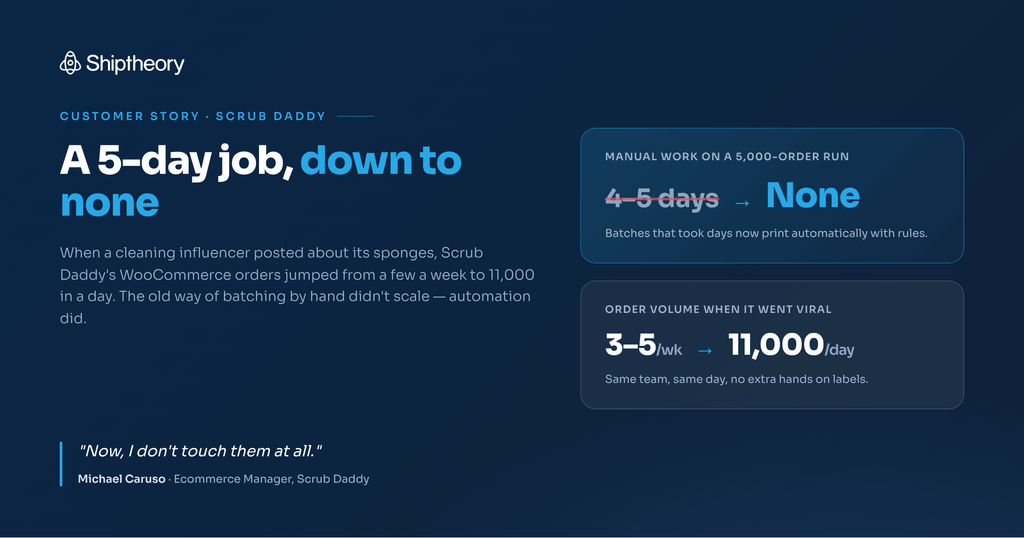
Scrub Daddy found this out when a cleaning influencer posted about its sponges, and its WooCommerce orders went from 3 to 5 a week to 11,000 in a day. In its old shipping software, the team assigned a box to every order and built batches by hand, which for a 5,000-order run would take 4 to 5 days. With Shiptheory, that work went from 5 days to none. "Now, I don't touch them at all," says Michael Caruso, Scrub Daddy's ecommerce manager.
You don't need that kind of spike for automation to pay off. If someone spends part of every day printing labels, rules give that time back, and the same rules don't slip on your busiest day.
Where Shiptheory fits
Shiptheory is for WooCommerce sellers who already have carrier accounts and want the label step to run itself. You keep the rates you've negotiated, the rules make the choices your team makes by hand today, and orders from every channel go through the same queue. If you also ship from the UK, Shiptheory connects Royal Mail, DPD and Evri too.
See how the WooCommerce integration works, check which carriers connect, or start a 14-day free trial with no credit card.
FAQs
What is the best shipping plugin for WooCommerce?
It depends on how you ship. For a US store wanting free, discounted labels, the official WooCommerce Shipping plugin or Pirate Ship is the cheapest. For UPS only, PluginHive's UPS plugin handles rates and labels inside WordPress. For sellers using their own carrier accounts across several channels, Shiptheory automates the whole label step.
Is there a free shipping plugin for WooCommerce?
Yes. WooCommerce Shipping is free and you pay only for labels, as is Pirate Ship. Shippo's free plan covers 30 labels a month, and the ShipStation extension is free, though you need a ShipStation plan.
Is there a USPS shipping plugin for WooCommerce?
Yes. WooCommerce Shipping and Pirate Ship both sell discounted USPS labels. To use your own USPS account, platforms such as Shiptheory connect it through a free Stamps.com account.
Is there a WooCommerce plugin for UPS shipping?
Yes. PluginHive's UPS plugin shows live UPS rates and prints labels on your own account. WooCommerce Shipping and Pirate Ship sell discounted UPS labels, and Shiptheory, ShipStation and Shippo connect your own UPS account.
Can WooCommerce print shipping labels?
Not on its own. You need a plugin such as WooCommerce Shipping, or a platform that connects to your store, such as Shiptheory, ShipStation, Shippo or Pirate Ship.
How much does WooCommerce shipping cost?
The WooCommerce Shipping plugin is free, and WooCommerce says its labels save up to 77%. Paid options range from $99 a year for a single-carrier plugin to monthly plans from $14.99 for platforms that handle several carriers and channels.